Showing posts with label computer trix. Show all posts

Google as a Hacking Tool

Monday, November 28, 2011 | comments

Everyday you use Google for searches but will you use it for hacking?

A Search Engine will continuously try to list almost all the websites available on the internet to make compete with other search engines.  In this process they also list vulnerabilities or simply speaking common mistakes/threats also. As we all know Google is one of the best search engine available. Here is some of the searches you can use to find exploits on Google.
Before continuing I have to say since this method is pretty popular most of the sites use honey pots(they pretend like a vulnerability but it is just to make u believe that they have a vulnerability). So BEWARE!!Just kidding
Enough of talking. Lets see some examples.

SSH logs on putty log files
Shell command logs.
Ok, this file contains what a user typed at a shell command prompt. You shouldn’t advertise this file. You shouldn’t flash it to a web crawler. It contains COMMANDS and USERNAMES and stuff… *sigh* Sometimes there aren’t words to describe how lame people can be. This particular theme can be carried further to find all sorts of things along these lines like .profile, .login, .logout files, etc. I just got bored with all the combinations…
SQL history
The .mysql_history file contains commands that were performed against a mysql database. A “history” of said commands. First, you shouldn’t show this file to anyone, especially not a MAJOR SEARCH ENGINE! Secondly, I sure hope you wouldn’t type anything sensitive while interacting with your databases, like oh say USERNAMES AND PASSWORDS…
Get ETC passwords
There’s nothing that defines a googleDork more than getting your PASSWORDS grabbed by Google for the world to see. Truly the epitome of a googleDork. And what if the passwords are hashed? A password cracker can eat cheesy password hashes faster than Elvis eatin’ jelly doughnuts. Bravo googleDorks! Good show!
Filezilla Passwords
filezilla.xml contains Sites,Logins and cryptic Passwords of ftp connections made with the open source programme filezilla.
Rapid share Passwords
Rapidshare login passwords.
Password XML
This returns xls files containing login names and passwords. it works by showing all the xls files with password:(something)so a downside is that u do get stuff like “password protected”, “password services” etc. (and the same for login)But…most of the decent ones have the login and password in the text given to you by google, so its easy to seperate the useful ones from the others. There are so many searches you can run on Google to find exploits. I will add them accordingly so stay tuned.Winking smile
Finally I am not taking any responsibility on any of the things you may do or you try to do using this information. Open-mouthed smile

Create Stunning Presentations

Saturday, November 26, 2011 | comments

Would you like to do stunning presentation? Leave the old transition based Power Point presentations. It is time to switch to storytelling presentation. It is all about the new era of presentation. “Prezi” ,  a Flash based online Presenting / Story Telling application.

This is the coolest presentation tool I have ever used and yet it is free of charge too. Here is the official intro  on Prezi. It would not take more than 1 min to watch it but I will guarantee you that it will save more than thousands of your boring presentation seconds. Working with Prezi is easy just go to Prezi and create a account and start building prezi. Be sure to visit their showcase to see what are the potentials and some useful template you can use to your presentation.

Temporarily disable Flash Debugger Errors

| comments (2)

Annoyed with the flash debugging errors comes up when you are browsing?Why do i keep getting a flash error in win 7? Want to temporary disable them? It is just a line you need to add to the configuration file.
These errors are showing because you have installed a flash player debugger version instead of the normal flash player. You can check your current player version from Adobe.

The easiest way to not get these error dialogues at all is to install the normal "release" version of the player. If you never debug SWFs in the browser, you can install the plugin/AX control there and not have to worry about it again, though this can be inconvenient if you do actually debug in the browser (which is more than likely the case for Flex users).
Once I was looking for this. I did not find a better tutorial on the internet. I found out the answer after reading several forums. So here is how you can do it.
Locate the configuration file of your adobe flash debugger. Check the path from the below table and the file name is mm.cfg Operating systemCreate file in ???/Library/Application Support/Macromedia C:\Documents and Settings\username
Open the configuration file in notepad and add the following line
SuppressDebuggerExceptionDialogs=1
Restart the browserRemember to restore those lines when you are debugging. :D Cheers!!

How to enable designer view in PHPMyAdmin

Friday, November 25, 2011 | comments (67)


Want to create relations between tables using a drag and drop GUI on PHPMyAdmin ?
This is a tutorial on how to enable designer view in PHPMyAdmin to easily manage tables and relations in between them. 
I assume you are familiar with PHPMyAdmin, GUI and already installed it on your machine. First check whether you have already enabled the designer view before going into any of the configurations.
Go to PHPMyAdmin and select a database (not a table). It should be something like below if you have designer view enabled. I am repeating again DO NOT select any tables.

If you can not see a tab called a "Designer". You need to configure PHPMyAdmin to enable it. Open config file of your PHPMyAdmin. If you use WAMP, XAMPP or LAMP or similar distribution the config file is at
path to the distribution\phpMyAdmin\libraries\config.default.php
Edit the config file and change the following fields as shown bellow.
$cfg['Servers'][$i]['pmadb'] = 'phpmyadmin';
$cfg['Servers'][$i]['bookmarktable'] = 'pma_bookmark';
$cfg['Servers'][$i]['relation'] = 'pma_relation';
$cfg['Servers'][$i]['table_info'] = 'pma_table_info';
$cfg['Servers'][$i]['table_coords'] = 'pma_table_coords';
$cfg['Servers'][$i]['pdf_pages'] = 'pma_pdf_pages';
$cfg['Servers'][$i]['column_info'] = 'pma_column_info';
$cfg['Servers'][$i]['history'] = 'pma_history';
$cfg['Servers'][$i]['designer_coords'] = 'pma_designer_coords';
Create a database on phpMyAdmin named “phpmyadmin” without quotes and execute the following sql code.
-- --------------------------------------------------------
-- SQL Commands to set up the pmadb as described in Documentation.html.
--
-- DON'T RUN THIS SCRIPT ON MySQL 4.1.2 AND ABOVE!
-- Instead, please run create_tables_mysql_4_1_2+.sql.
--                                                
-- This script expects the user pma to already be existing. If we would put a
-- line here to create him too many users might just use this script and end
-- up with having the same password for the controluser.
--                                                    
-- This user "pma" must be defined in config.inc.php (controluser/controlpass)                        
--                                                 
-- Please don't forget to set up the tablenames in config.inc.php                                
--
-- $Id: create_tables.sql 10257 2007-04-07 14:40:24Z lem9 $
-- --------------------------------------------------------
--
-- Database : `phpmyadmin`
--
DROP DATABASE IF EXISTS `phpmyadmin`;
CREATE DATABASE `phpmyadmin`;
USE phpmyadmin;
-- --------------------------------------------------------
--
-- Privileges
--
GRANT SELECT, INSERT, DELETE, UPDATE ON `phpmyadmin`.* TO
'pma'@localhost;
-- --------------------------------------------------------
--
-- Table structure for table `pma_bookmark`
--
CREATE TABLE `pma_bookmark` (
`id` int(11) NOT NULL auto_increment,
`dbase` varchar(255) NOT NULL default '',
`user` varchar(255) NOT NULL default '',
`label` varchar(255) NOT NULL default '',
`query` text NOT NULL,
PRIMARY KEY  (`id`)
) TYPE=MyISAM COMMENT='Bookmarks';
-- --------------------------------------------------------
--
-- Table structure for table `pma_column_info`
--
CREATE TABLE `pma_column_info` (
`id` int(5) unsigned NOT NULL auto_increment,
`db_name` varchar(64) NOT NULL default '',
`table_name` varchar(64) NOT NULL default '',
`column_name` varchar(64) NOT NULL default '',
`comment` varchar(255) NOT NULL default '',
`mimetype` varchar(255) NOT NULL default '',
`transformation` varchar(255) NOT NULL default '',
`transformation_options` varchar(255) NOT NULL default '',
PRIMARY KEY  (`id`),
UNIQUE KEY `db_name` (`db_name`,`table_name`,`column_name`)
) TYPE=MyISAM COMMENT='Column information for phpMyAdmin';
-- --------------------------------------------------------
--
-- Table structure for table `pma_history`
--
CREATE TABLE `pma_history` (
`id` bigint(20) unsigned NOT NULL auto_increment,
`username` varchar(64) NOT NULL default '',
`db` varchar(64) NOT NULL default '',
`table` varchar(64) NOT NULL default '',
`timevalue` timestamp(14) NOT NULL,
`sqlquery` text NOT NULL,
PRIMARY KEY  (`id`),
KEY `username` (`username`,`db`,`table`,`timevalue`)
) TYPE=MyISAM COMMENT='SQL history for phpMyAdmin';
-- --------------------------------------------------------
--
-- Table structure for table `pma_pdf_pages`
--
CREATE TABLE `pma_pdf_pages` (
`db_name` varchar(64) NOT NULL default '',
`page_nr` int(10) unsigned NOT NULL auto_increment,
`page_descr` varchar(50) NOT NULL default '',
PRIMARY KEY  (`page_nr`),
KEY `db_name` (`db_name`)
) TYPE=MyISAM COMMENT='PDF relation pages for phpMyAdmin';
-- --------------------------------------------------------
--
-- Table structure for table `pma_relation`
--
CREATE TABLE `pma_relation` (
`master_db` varchar(64) NOT NULL default '',
`master_table` varchar(64) NOT NULL default '',
`master_field` varchar(64) NOT NULL default '',
`foreign_db` varchar(64) NOT NULL default '',
`foreign_table` varchar(64) NOT NULL default '',
`foreign_field` varchar(64) NOT NULL default '',
PRIMARY KEY  (`master_db`,`master_table`,`master_field`),
KEY `foreign_field` (`foreign_db`,`foreign_table`)
) TYPE=MyISAM COMMENT='Relation table';
-- --------------------------------------------------------
--
-- Table structure for table `pma_table_coords`
--
CREATE TABLE `pma_table_coords` (
`db_name` varchar(64) NOT NULL default '',
`table_name` varchar(64) NOT NULL default '',
`pdf_page_number` int(11) NOT NULL default '0',
`x` float unsigned NOT NULL default '0',
`y` float unsigned NOT NULL default '0',
PRIMARY KEY  (`db_name`,`table_name`,`pdf_page_number`)
) TYPE=MyISAM COMMENT='Table coordinates for phpMyAdmin PDF output';
-- --------------------------------------------------------
--
-- Table structure for table `pma_table_info`
--
CREATE TABLE `pma_table_info` (
`db_name` varchar(64) NOT NULL default '',
`table_name` varchar(64) NOT NULL default '',
`display_field` varchar(64) NOT NULL default '',
PRIMARY KEY  (`db_name`,`table_name`)
) TYPE=MyISAM COMMENT='Table information for phpMyAdmin';
-- --------------------------------------------------------
--
-- Table structure for table `pma_designer_coords`
--
CREATE TABLE `pma_designer_coords` (
`db_name` varchar(64) NOT NULL default '',
`table_name` varchar(64) NOT NULL default '',
`x` INT(11) default NULL,
`y` INT(11) default NULL,
`v` TINYINT(4) default NULL,
`h` TINYINT(4) default NULL,
PRIMARY KEY (`db_name`,`table_name`)
) TYPE=MyISAM COMMENT='Table coordinates for Designer'
That it Now you can access the designer tab on PHPMyAdmin. For more details refer

How to use a Proxy

Tuesday, November 22, 2011 | comments

 
Ever wanted to anonymously browse web, browse as you are in another country, watch TV series and Movies as they are telecasted , Get visitors for your blog around the world?
According to Wikipedia proxy is a computer network service that allows clients to make indirect network connections to other network services. When you open a web site it will get your IP address from which they can identify the country you are connecting from. Using a proxy you can change the country you are connecting from. ·         Access any restricted sites·         Watch TV series and movies available free on other countries (Some countries like USA, UK allow all their TV channels to be viewed online free for all the USA citizens.)·         Play with low pings on the game servers which are not in your country.·         Hide your identity from the site records·         Hide your identity from the network (Network administrator will not be able to track the pages you visit since you are using a tunnel to browse)·         Hide records on the machine (You can encode the web address and the other will not be able to understand them)·         To keep machines behind it anonymous (mainly for security)·         To speed up access to resources (using caching). Web proxies are commonly used to cache web pages from a web server. ·         To apply access policy to network services or content, e.g. to block undesired sites.·         To log / audit usage, i.e. to provide company employee Internet usage reporting.·         To bypass security/ parental controls.·         To scan transmitted content for malware before delivery.·         To scan outbound content, e.g., for data leak protection.·         To circumvent regional restrictions.Since we are connecting through another site, your security is not assured. These site may have system to record your details and it is recommended not use any login information on a site you accessed through a proxy!!This is mainly used to access web sites. You simply need to enter the web address on those sites and you will be taken in to that using through another site. This is a good solution if you only want to browse web using a proxy. Some proxy sites only allow html to be bypassed. So you videos and flash content will not be visible on the page. However there are some good proxies which allow all the content. You can find so many web proxies listing on the internet. Just search for Proxy on the internet. (Google search for web Proxies).This is the other option you can use. This will bypass all the network connection on the machine thorough a proxy. If you are have Windows Media Center or HULU desktop you can use this option to watch TV series online free. This is little complicated and the step you need to follow are below on the tutorial. There are 3 types of System proxies§  Transparent Proxy – IP address can be caught, such proxies usually used to increase internet speed and decrease amount of abroad traffic (some internet providers grant their user free local traffic).        Browse restricted sites you does not care about sharing your identity        Watch TV series. (This is a speed connection and will allows fast streaming but some sites identify this. Then use a anonymous proxy.) §  Anonymous Proxy – IP address can not be caught by server but server knows that proxy was used during connection. It is very useful to be anonymous surfing in internet .        Watch TV series if above fails §  Elite Proxy – IP address as well as fact that proxy was used during connection can not be caught by server. Best way to hide any information about you presence in internet.1.       Find a proxy server. It will be in the format of 192.145.164.124:8080. In that IP address 192.145.164.124 is the proxy and the 8080 is the port. (You can find proxy IP address on some sites. Use one of the following options. Google search for proxy. Proxy List.)2.       If you use windows machine, open internet explorer. Go to Tools-> Internet Options. You can go there using the control panel as well.3.       Go to Connections tab and click on the LAN settings button. On the new window tick on the last tick box and enter the proxy.4.       Click OK and Apply the settings and click OK on the parent window.·         When you set up the system proxy, you can browse web using IE or Chrome or any other software. (except firefox. If you want to use firefox go to its settings (Tools->Options) open Network Tab click Settings Button-> Select Use system proxy settings)·         Some proxies listed may not available all the time. If not try a new proxy.

Watch 3D without Glasses

Monday, November 21, 2011 | comments (17)

3D is the new technology of the video. But they require you to wear expensive glasses to view them. Would you like to view 3D videos without glasses?As the topic suggest you do need to have 3D glasses to view 3D. So what do you need? Actually you don’t need anything except a colour display. :PBefore we continue here is a brief introduction to what we are doing. Strongly suggest you to read before you continue.
3D photography and videos also known as Stereo videos and photographs require two pictures, one for each eye. As the way you see real world objects. When you see real world objects you see the same image from both eyes but slightly different in angle due to difference in between eyes.As normal visual, in this 3D vision, the pictures must be presented to your eyes so that each eye sees only the picture intended for it. Generally two methods are used: Both methods require one to learn a new visual skill.Normally when we look at the "real" world, our eyes converge on an object in the scene and they also focus on that same object. We habitually do this, and our brains have become accustomed to a one-to-one correspondence between focus and convergence.We can learn to "unlock" focus and convergence, enabling us to view stereo pairs without optical aid. In this tutorial we use a display method which can be adapted to either parallel-eye viewing or crossed-eye viewing. Three pictures will be shown side by side. The middle one is to be viewed with the right eye. The other two are identical and one is to be viewed with the left eye. Here's how to view them.(1) Parallel viewing. This is sometimes called wall-eyed viewing. Use the left and middle pictures only. Look at a distant object then bring your eyes down to the paper trying not to converge or focus on the paper. You'll see a blurred double image. Consciously try to bring the double image into one. Now try to focus your eyes on it without allowing the two images to drift apart.Parallel viewing is limited to pictures about 2.5 inches wide, the spacing of the typical human eye (which averages 65 mm).(2) Cross eyed viewing. Use the right and middle pictures only. Hold your finger exactly halfway between your eyes and the page. Focus on your finger. Your eyes will be converged on the finger also, and you should be conscious of the two pictures out of focus behind your finger, but probably nearly coincident. Move your finger a bit until the two pictures are fully coincident. Now hold that convergence while refocusing from your finger to the page. Finally, you can remove your finger from the field of view.Crossed eyed viewing can be used with even larger pictures. Paintings have been presented this way. Salvadore Dali painted some of this kind. For those who can learn the skill of viewing, this is one of the most effective ways for viewing stereo without special glasses. (2) Mirror method. For completeness, we illustrate a method rarely used in printed books. Popular Photography magazine experimented with it for a while. One picture of the pair is printed normally, ad the other is printed beside it, but reversed left/right. That picture is viewed through a mirror which re-inverts it. We will not use that method here.  You can use the above techniques to view the below image
After all those stuff it is time to move into an actual image and feel the 3D. Below are some of the pictures I got from the internet. You can view them in 3D using cross eye technique.

You can find galleries of 3D images at You can find thousands of other sites where you can view 3D image gallery.When moving on to video, it is very tricky. But the methodology is the same. You can view them on all the techniques mentioned above. Youtube recently launched an their 3D videos and users can upload their 3D videos to youtube now. But before we watch them here is a video uploaded before youtube launched 3D.
It is time to switch to 3D mode in youtube. It is just 2 simple steps·         First go to Select 3D Mode on youtube. And select “View video with no 3D device”·         You are ready to view 3D. Try one of the following videos. (You will notice there is a new menu before the resolution menu on youtube lower panel when you are watching a 3D video)Here is a 3D video channel. You can search for more on youtube

Sticky Notes

| comments (3)

Posted by Pasindu If you are a regular Windows 7 sticky notes user, you might find these tips, tricks to use, format, backup and restore handy.

Once its running and you start making notes, you can use the following keyboard keys to format its text:
Select the text where required, and then press the desired keys:

Bold: Ctrl+BItalics: Ctrl+IUnderline: Ctrl+UStrikethrough: Ctrl+TBullet list: Ctrl+Shift+LIncrease size of text: Ctrl+Shift+>Decrease size of text: Ctrl+Shift+Backup and Restore Sticky Notes.You can backup the Windows 7 Sticky Notes by backing up this file to another location : 
C:\Users\ACK\AppData\Roaming\Microsoft\Sticky Notes\StickyNotes.snt 
You may have to show hidden/system files via the Folder Options. To restore it, delete the sticky notes from your desktop and copy paste the backed up one into the folder
C:\Users\ACK\AppData\Roaming\Microsoft\Sticky Notes

Windows Shortcut Keys

Friday, November 18, 2011 | comments (13)


  Mastering the keyboard will not only increase your navigation speed but it can also help with wrist fatigue. Here are some lesser known Windows shortcuts to help you become a keyboard ninja. Win + Tab beautiful tab explorer Win+1, 2, 3, 4, etc. will launch each program in your taskbar. It is helpful then to keep your most used programs at the beginning of your task bar so you can open them one right after another. This also works in Windows Vista for the quick launch icons. Win+Alt+1, 2, 3, etc. will open the jump list for each program in the taskbar. You can then use your arrows to select which jump list option you want to open. Ctrl+Shift+Esc will open the task manager without needing to hit Ctrl+Alt+Del first. Win+T will cycle through taskbar programs. This is similar to just hovering over the item with your mouse but you can launch the program with Space or Enter.Ctrl+Shift+N creates a new folder in your current directory.Ctrl + Tab or Ctrl + Shift + Tab move though tabs of the web browser F2 renames a file or folder.Win+B selects the system tray which isn’t always useful but can come in very handy if your mouse stops working. F3 will open explorer and select the search bar. If you already have an explorer window open it will highlight the search bar. In some programs it will also open the search dialog to search within that program.Win+Up/Down maximizes and restores down the current window so long as that window has the option to be maximized. It is exactly the same as clicking on the middle button on your windows.Ctrl + Alt + Arrow keys change the direction of the screen.Win + Arrow Keys put the current window maximized or to a sideFor more shortcuts

View Deleted/Removed YouTube Videos

Tuesday, July 5, 2011 | comments (30)

How is this possible? Well when a video has been removed from YouTube, it is not immediately deleted from their servers. Just like our hard drive. When we delete a file and empty the recycle bin, is it not really deleted. It is only marked as deleted and is ready to be overwritten. So if it is not being overwritten, we can still view the videos but of course not from youtube.com.


Viewing removed YouTube videos is easy. Here's how to do it.


First of all, you need to know the Video ID which is at the end of the YouTube link. An example of a YouTube video link is http://www.youtube.com/watch?v=UzeV1Ux5YlI

The video ID for the link above is UzeV1Ux5YlI


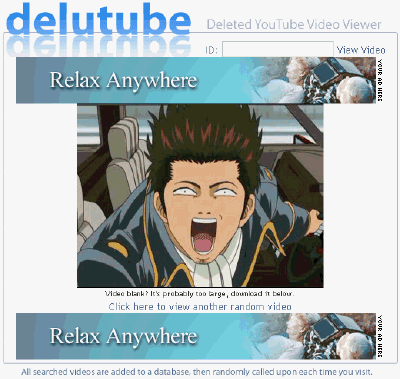
Just copy and paste it in the ID text box and click view video. Here are a few sites that is able to play deleted YouTube videos. Surprisingly, they are all not the same. I've tested a deleted video ID on all 3 sites but one of it reported that it could not find deleted video. So if you desperately need to watch a deleted video, try on all of the sites and you might get to watch it.

1. UndeleTube


- A normal deleted youtube video viewer. Works well.

2. DeletedYoutubeViewer


- This is a bit special compared to the other two because you are able to search for deleted YouTube video through the VideoID or YouTube User. If you know the user that uploaded the deleted video, you can search the user name.

3. Delutube


So did you enjoy? Leave a comment.Good Bye.


NOTE------ Most of sites are scam now. I posted another tricks to Watch Deleted Videos on YouTube. Click here to read it.

Making Videos of Game and Record all activities on the Screen Monitors

Thursday, May 19, 2011 | comments

 This application is FRAPS.


How to use it, fairly easy, you only need to install FRAPS and at the running game, to record it you only need to press F9 key.
example of his game could be like Pointblank, Dota, etc.
and you also can record the activity on your monitor.


File is quite small, only 3.33 Mb. But the movie can be large, depending on the duration of your record, can be up to 1 Gigabytes.
Download here 


Support : Sanjaya Einy | Blogger Tricks Templatee
Copyright © 2011. Tips and Tricks NET - All Rights Reserved
Template Created by Creating Website Published by Mas Template
Proudly powered by Premium Blogger Template